画像と日本語と英語のテキスト。テキストには「OneEcosystem パブリック ブロック チェーン展開の手順 ONE ECOSYSTEM」と書かれています。背景は、ネットワーク グラフィックを使用した赤から濃い青へのグラデーションです。

OneEcosystem Public Blockchain Deployment Instructions

* If you are a Bronze member or above, you can read the following articles without advertisements.
画像と日本語と英語のテキスト。テキストには「OneEcosystem パブリック ブロック チェーン展開の手順 ONE ECOSYSTEM」と書かれています。背景は、ネットワーク グラフィックを使用した赤から濃い青へのグラデーションです。

On March 22, 2025, the end of the transition period to public blockchains was officially announced. For details Here...

1. Make sure you have enough money to expand your account

The amount of money required to expand the account is published in the official newsletter, so please check the official newsletter. Below we will introduce you to the same price list.

If you don't have the money needed to deploy a public blockchain, you'll need to top up your wallet from Top Up Chash Wallets. Charges can only be made in BTC or USDT. How to charge Article here You can find instructions here. If you are having trouble charging Contact us Please.

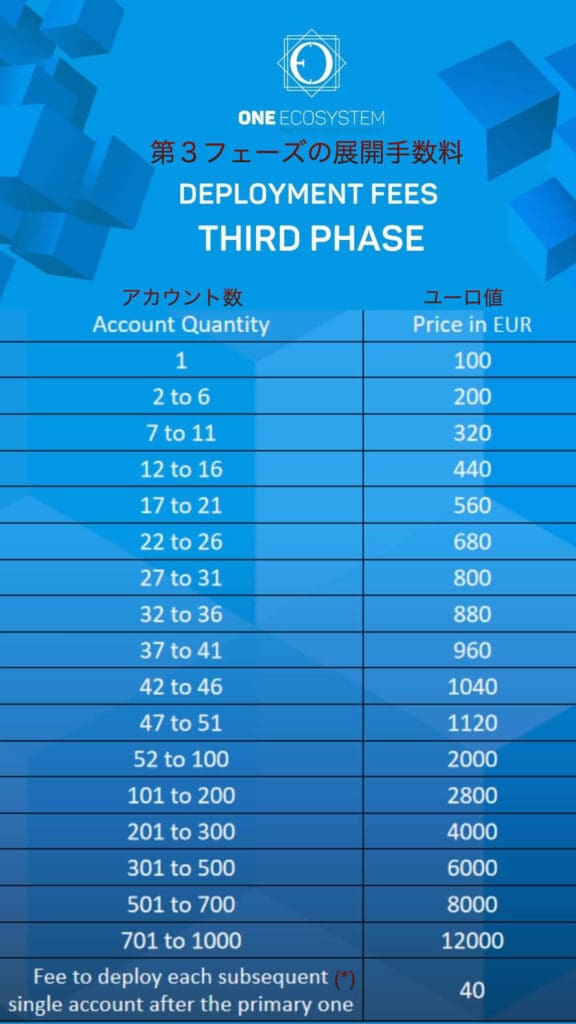
The fee you have to pay to the company depends on the number of accounts you have. Please check the official price list for the exact price. Currently, the following deployment fees are set.

青いチャートには、アカウント数に応じた導入料金が表示され、1 から 1000 のアカウントまでの価格がユーロで詳細に示されています。別の注記には、後続の各アカウントの追加料金が示されています。

The €40 in the table above is not the cost of the mass deployment, but the amount charged from the deployment of the second account when deploying individually.

** If you do not have Reserve Cash, you will pay in full Cash. The above fees are based on the sum of Cash and Reserve Cash. Therefore, if you do not have Reserva Cash, you will need to pay the full amount of Cash + Reserve Cash in Cash. If you request ONEJAPAN to pay the fee on your behalf, we will send you Cash and Reserva Cash together.

If you don't know how to pay, please consult your referral or upline. If you do not have a place where you can consult, please contact ONEJAPAN. We charge fees on your behalf. For more information, see OneEcosystem Public Blockchain Deployment Fee Payment Request Form Please refer to the following statement.


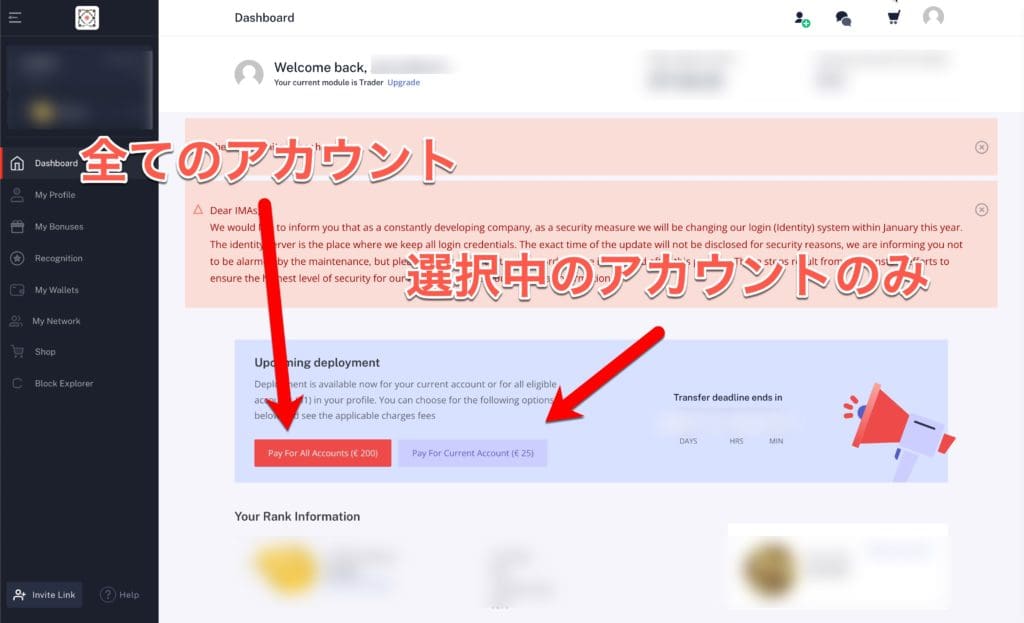
2. Open the dashboard and click on either the bolan to expand all accounts or only the currently selected account.

If you want to expand all accounts at the same time, click the red button.

If you want to expand only one of the currently selected accounts, click on the purple boran on the left.

日本語のテキストが重ねて表示されたダッシュボード画面。テキストはアカウント操作のボタンを指しており、すべてのアカウントと選択したアカウントのみについて言及しています。その他のメニュー項目とユーザー情報は表示されますが、ぼやけています。

* For the purpose of creating this manual, I clicked on the expansion of "Selected accounts only".


3. Select a payment method.

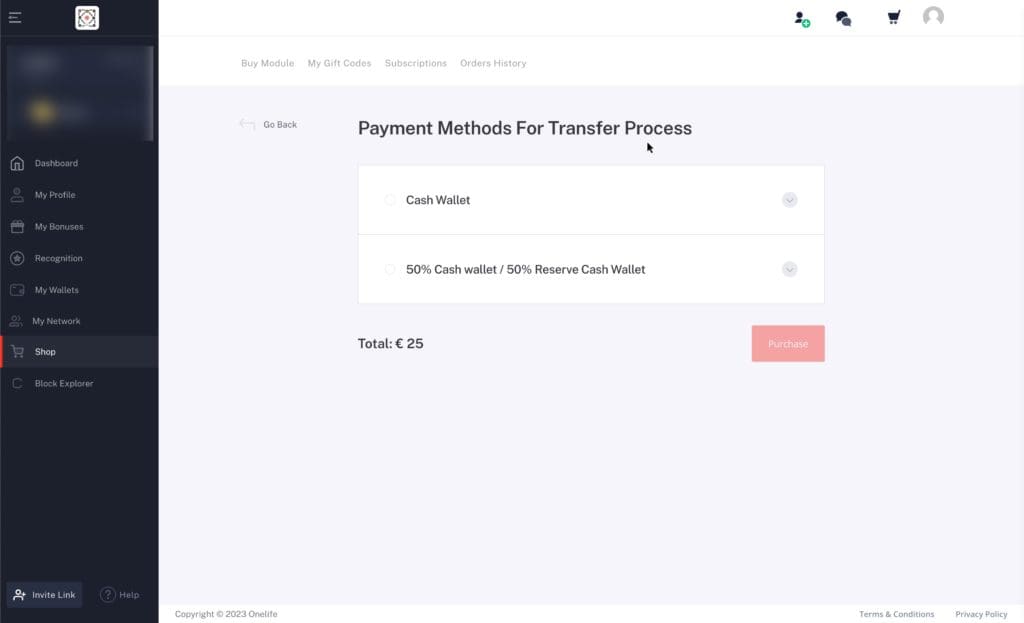
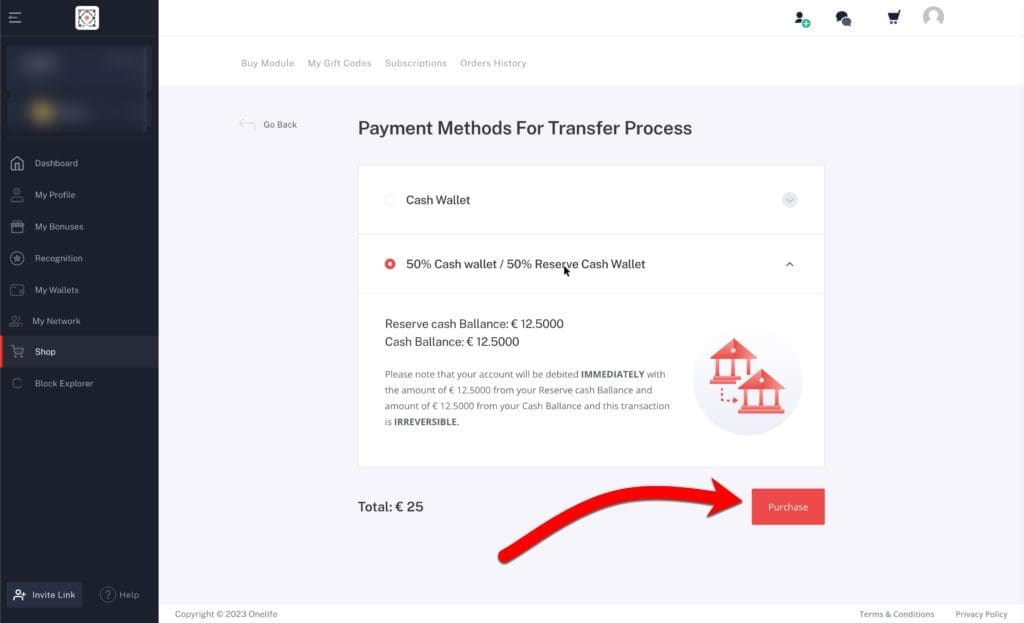
You can use a Cash wallet or a Reserve Cash wallet as a payment method, but you can choose to pay in full Cash or partial Cash / Partial Reserve Cash. In short, you can choose "Full Cash" or "50% Cash wallet / 50% Reserve Cash wallet".

「送金手続きの支払い方法」というタイトルのウェブページに、支払いオプションが表示されます。ユーザーは「現金ウォレット」と「50% 現金ウォレット / 50% 準備金現金ウォレット」から選択できます。合計金額は 25 ユーロです。

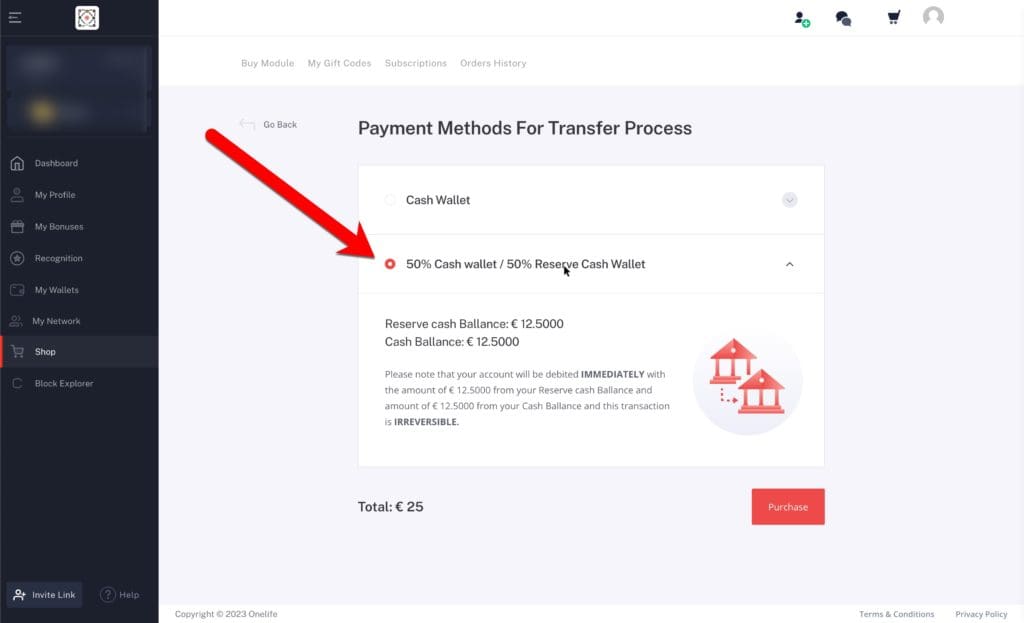
4. In this example, select 50% Cash wallet / 50% Reserve Cash wallet. If you don't have Reserve Cash, select Cash Wallet.

選択された支払い方法オプションを示すオンライン支払いページのスクリーンショット: 50% 現金ウォレット / 50% レセプ現金ウォレット。赤い矢印がこのオプションを指しています。支払う合計金額は 25 ユーロです。

5. Click on the "Purchase" red button.

Once you've selected your payment method, click on the "Purchase" red button.

支払い方法の選択画面には、Cash Wallet と、準備残高の指示、および赤い矢印で示された「購入」ボタンが表示されています。合計金額は 25 ユーロです。

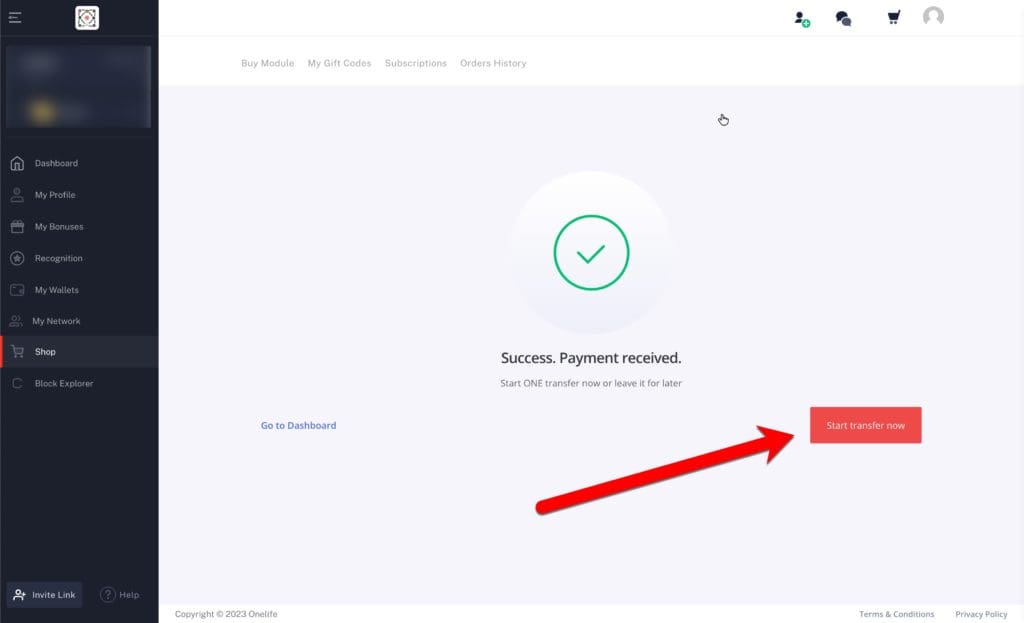
6. Click Start transfer now to start the deployment.

確認画面に「成功。支払いを受け取りました。」と緑のチェックマークが表示されます。赤い矢印は右下にある「今すぐ送金を開始」というボタンを指しています。

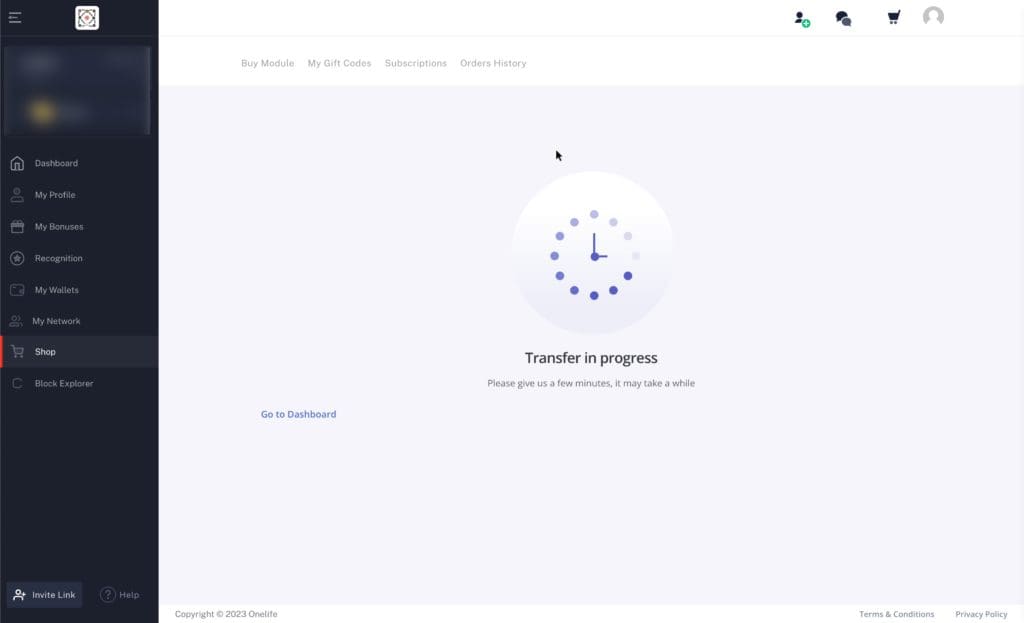
7. A clock icon will appear as shown in the picture below, indicating that an expansion is taking place.

転送進行中の画面を表示する Web ページ。時計のグラフィックと「転送が進行中です。しばらく時間がかかる場合がありますので、しばらくお待ちください。」というメッセージ、および「ダッシュボードに移動」へのリンクが表示されます。

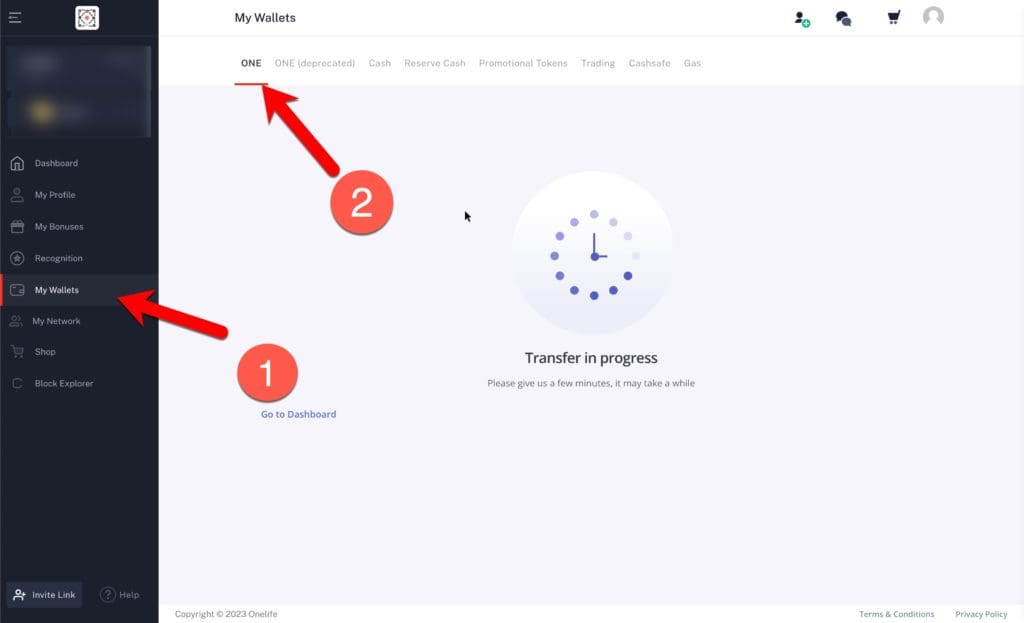
8. Click (1) My Wallets -> (2) ONE to display the ONE wallet, and you will see the same watch screen as above.

「転送中」というメッセージと円形の読み込みアイコンが表示された Web ページ インターフェイス。赤い矢印は、左側のサイドバーの「ダッシュボードに移動」と上部の「ONE」タブを指しています。

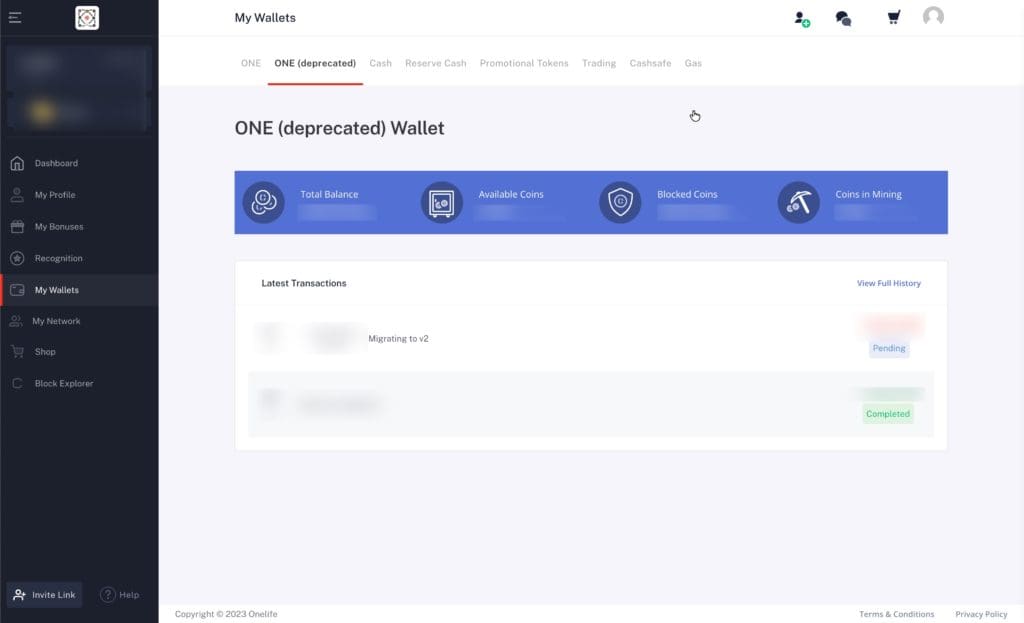
9. You can see that the new wallet (ONE (deprecated)) is listed in the wallet menu. You can see that this is a private blockchain wallet, and the one that shows only ONE is the new public blockchain wallet.

「ONE (非推奨) Wallet」というタイトルのウォレットを表示するユーザー インターフェイス。合計残高、利用可能なコイン、ブロックされたコイン、マイニング中のコインのセクションがあります。トランザクション リストが下に表示されます。
Contact us
If you have any problems, please contact OneEcosystem. If you find it difficult to communicate in English, please consult with your introducer or contact ONEJAPAN.

Questions about the above article

Questions related to the above article require a subscription of Bronze Supporter or higher.
Please log in or sign up.
Sign up
重なり合う形状を持つ 3D 幾何学デザインを特徴とする、様式化された赤とグレーのロゴ。 Copyright © 2020 – 2026 All Rights Reserved

Providing accurate information to the OneEcosystem community in Japan, sharing knowledge and facilitating member participation and improved experiences.
To the top
magnifier cross

Need help? Please contact our help desk.

2
0
Please let us know your comments and opinions about this article. x
( )
x